"I want to reach out to them, but the language..."
You found an interesting band on the recruitment page. You looked at their profile and thought, "I want to play with this person." But their profile was in English. Or Chinese. — Have you ever given up on sending a message the moment you realized the language barrier?
In my twenties, I moved to Tokyo and started playing in a band based at Mandala in Kichijoji. I also frequented UZU in Fussa and met dozens of musicians. Among them, of course, were foreigners. They say you don't need words when the music fits together — that's half true. During a session or live performance, you can understand each other through sound alone.
But the very first words, "Would you like to play together?" are the hardest part.
"Where should we practice?" "What kind of music do you like?" "Are you free next Sunday?" — In the everyday exchanges necessary for band activities, you hit the language wall. Opening a translation app and copying and pasting is tedious, and often the nuance doesn't come through.
Membo's translation chat was created to remove that wall with just one tap.
How to Use Translation Chat — The Language Barrier Disappears with One Tap
First, open the message screen from My Page. The Direct tab displays a list of people you're communicating with.
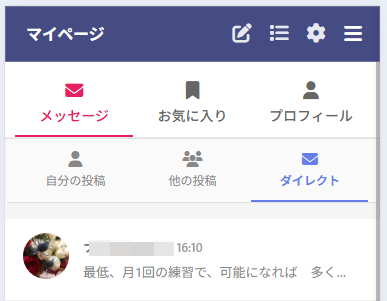
Tap on a contact and the chat screen opens. What you should pay attention to is the globe icon at the top of the screen.

The usage is simple. Just tap the globe icon once. That's all it takes to automatically translate the other person's message into your language. Once you turn it ON (a checkmark appears on the icon), messages from the other person will be automatically translated from then on. No need to operate anything repeatedly.
Translation Chat from a Japanese User's Perspective
Let's look at an actual screen. Here, a Japanese user and a Taiwanese user are having a conversation.
Translation OFF — The Other Person's Language is Displayed as-is
When translation is OFF, messages from a Taiwanese user are displayed as-is in Traditional Chinese (Taiwan).
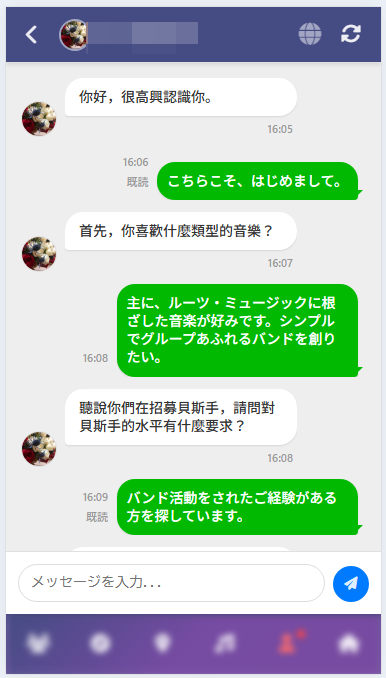
"你好,很高興認識你。" "首先,你喜歡什麼類型的音樂?" — If you don't understand Traditional Chinese (Taiwan), you have no idea what they're saying.
Now tap the globe icon —
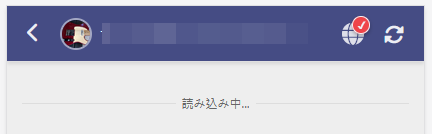
Translation ON — Readable in Japanese!
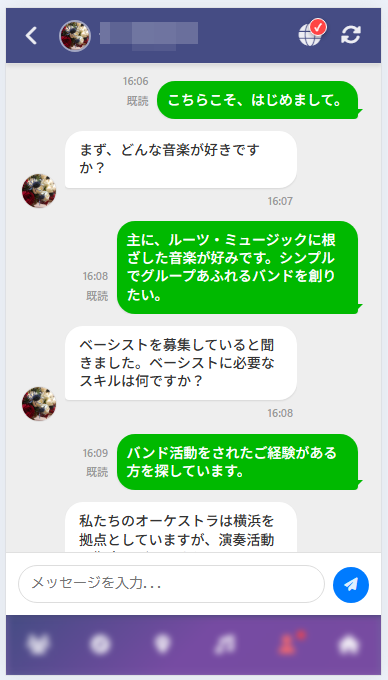
"Nice to meet you too." "First, what kind of music do you like?" "I heard you're recruiting a bassist. What skills are needed for a bassist?" — The Traditional Chinese (Taiwan) messages that were unreadable just moments ago are now natural Japanese.
Your own Japanese messages (green speech bubbles) remain unchanged. Only the other person's messages are translated. So you can tell at a glance which messages are translated.
Translation Chat from a Taiwanese User's Perspective
Now let's look at the same conversation from a Taiwanese user's perspective. Translation chat works bidirectionally.
Translation OFF — Japanese Messages Displayed as-is
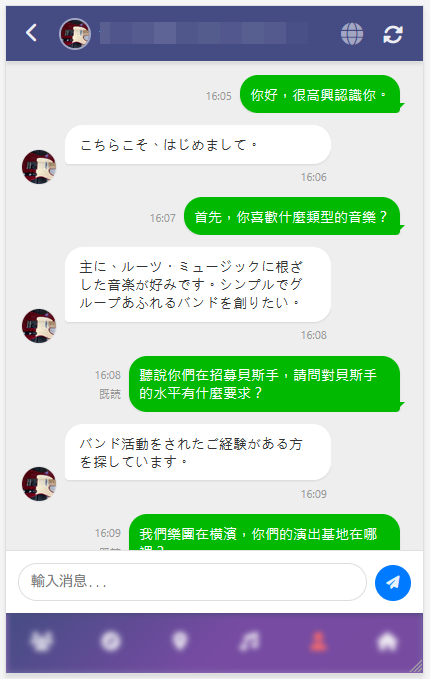
From the Taiwanese user's point of view, messages sent by the Japanese person such as "Nice to meet you too." and "I mainly like music rooted in roots music." are displayed in Japanese. If you don't understand Japanese, conversation is impossible.
Tap the globe icon the same way —
Translation ON — Readable in Traditional Chinese!
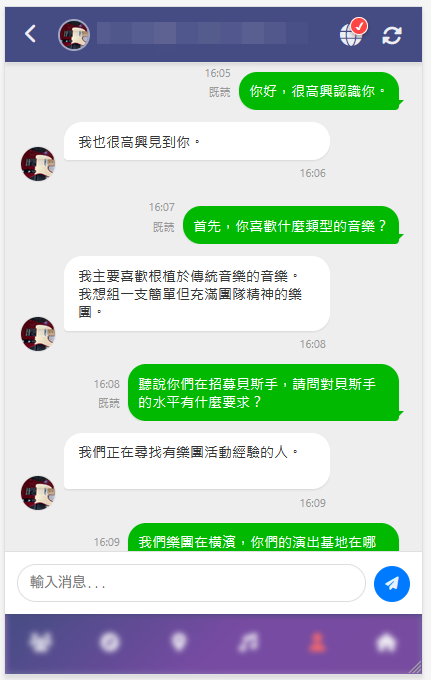
"我也很高興見到你。" "我主要喜歡根植於傳統音樂的音樂。我想組一支簡單但充滿團隊精神的樂團。" — The Japanese written by the Japanese person is translated into Traditional Chinese (Taiwan) and displayed.
Each person writes in their own language, and each person reads in their own language. That's Membo's translation chat.
PWA Support — Receive Notifications from Your Home Screen
Membo supports PWA (Progressive Web App). If you register an icon on your smartphone's home screen, you can use it like a native app.
And if you set up push notifications —
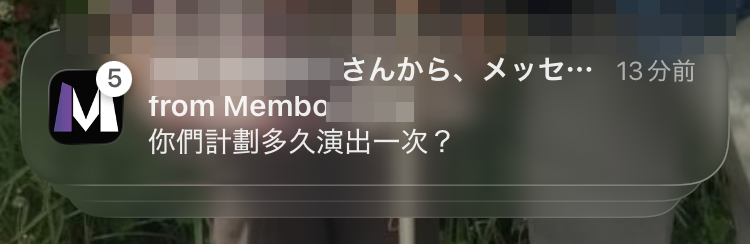
When the other person sends a message, you get a notification on your smartphone even if you don't have the app open. You won't miss important messages. "Studio schedule change" "Today's rehearsal location" — Get real-time updates for the communications essential to band activities.
8-Language Support — Communicate in Any Combination
Membo's translation chat supports the following 8 languages.
| Language | Notation |
|---|---|
| Japanese | 日本語 |
| English | English |
| Simplified Chinese | 简体中文 |
| Traditional Chinese (Taiwan) | 繁體中文 |
| Korean | 한국어 |
| Vietnamese | Tiếng Việt |
| Nepali | नेपाली |
| Hindi | हिन्दी |
Not just Japanese ↔ English, but Korean ↔ Vietnamese, Nepali ↔ Traditional Chinese (Taiwan) — translation chat works with any language combination.
The number of foreigners engaged in musical activities in Japan is increasing year by year. Not just Tokyo, but also Osaka, Nagoya, and Fukuoka. Especially the Japanese resident communities from Vietnam and Nepal are growing rapidly, and many people are seeking connections through music.
Membo is a service built to realize encounters with music partners across nationalities without language barriers.
Comparing Membo with Other Band Member Recruitment Services
There are several band member recruitment services, but Membo is the only one with a built-in multilingual translation feature. If you're serious about meeting foreign band members, this difference is decisive.
| Service | Translation Chat | Supported Languages | Price | Features |
|---|---|---|---|---|
| Membo | ✅ Real-time Translation | 8 languages | Completely Free | Multilingual Support・PWA・Push Notifications |
| OURSOUNDS | ❌ None | Japanese only | Free | Japan's largest (650k monthly users)・Japanese only |
| bandcrew | ❌ None | Japanese only | Free | Bulletin board type (33k monthly PV) |
| BandMix.jp | ❌ None | English-based | Paid (Monthly subscription) | International・English-speaking region focused |
| SNS (X, etc.) | ❌ None | — | Free | Difficult to search・Messages get lost easily |
OURSOUNDS is Japan's largest service with 650,000 monthly users, but it only supports Japanese. bandcrew is a bulletin board-type service with 33,000 monthly page views, also limited to Japanese. BandMix.jp is English-based and requires a monthly subscription. None of these services have a feature that bridges Japanese and foreign languages in real-time.
A detailed comparison of each service is available at Comprehensive Band Member Recruitment Site/App Comparison [2026 Edition].
Membo's Basic Features and Getting Started
Membo is a completely free band, theater, and circle member recruitment service. In addition to translation chat, all of the following features are available for free.
Main Features
- Member Recruitment & Search — Filter by genre, instrument/role, and region. Cross-search recruitment information in 8 languages
- 8-Language Real-Time Translation Chat — The feature introduced in this article. Automatic translation with one tap
- Profile Privacy Settings — Fine-grained control over who can see your profile. You can stay active without using your real name
- PWA Support — Add to your home screen and use it like an app. Never miss important messages with push notifications
- Map-Based Search — Find members active nearby on a map
Getting Started — 3 Steps
- Free Account Registration — Registration complete with just an email address. No credit card required
- Search for Members — Find members you're interested in by genre, instrument/role, and area
- Contact via Translation Chat — No matter what language the other person uses, you can chat in your own language
Instructions for adding to your home screen and detailed push notification setup steps are available with images on the How-To Guide page.
Practical Guide for Collaborating with Foreign Band Members
Once you've made initial contact through translation chat, it's time for actual band activities. The How Foreigners Find Band Members in Japan article also covers this, but here we'll outline concrete steps for using translation chat.
Studio Booking Conversations
When rehearsing with foreign band members at a studio, booking arrangements become the first hurdle. With translation chat, exchanges like these come through clearly:
- "I booked Noah Studio for 2 PM on Saturday. 3 hours."
- "I reserved a studio with a drum kit. We have 2 Marshall guitar amps."
- "I'll send you the studio's address. The nearest station is ○○, a 5-minute walk."
Studio names and station names are proper nouns, so they won't be translated and will come through as-is. The trick is to include the address or station name in your message so the other person can easily search it on a maps app. For studio selection tips and pricing information, check out How to Choose a Band Practice Studio.
Coordinating Practice Schedules
Scheduling band practice is challenging even between Japanese people, but it becomes even more confusing with language differences. Here are tips for coordinating with translation chat:
- Write dates and times in numbers — "3/29 (Sat) 2:00 PM–5:00 PM" gets the message across more accurately than "next Saturday"
- Offer 2–3 options — Present choices like "3/29 or 3/30, which is better?"
- Confirm once decided — Do a final check: "OK, confirmed for 3/29 (Sat) 2:00 PM at Noah Studio Shinjuku!"
Translation isn't perfect. That's why using numbers, proper nouns, and bullet points to organize information ensures accurate communication regardless of language.
Sharing What to Bring on Rehearsal Day
You can also share checklists of what to bring and what to prepare through translation chat:
- "Guitar, cable, tuner, picks, lyric sheet"
- "The studio has drums, but bring your own sticks"
- "No PA system needed. We can use the studio's equipment"
Instrument and equipment names often use universal terminology, so translation is unlikely to cause confusion. Writing specific item names ensures clear communication.
Take Your First Step with Translation Chat
If you've hesitated to send a message just because the other person is a foreigner, there's no need to hold back anymore.
With translation chat —
- No matter what language the other person writes in, you can read in your language
- You just write in your language. The other person reads it translated
- Once you turn on translation, it's automatic from then on. You only operate it once
Nationality and language don't matter. You can start playing sessions and forming bands where a single sound brings understanding, more freely than ever. That's what Membo's translation chat is all about.
If you don't have an account yet, start with free account registration. Also check out How Foreigners Find Band Members in Japan and Complete Guide to Starting a Band This Spring.